Open-Source Text-to-Image Models for ComfyUI Handoffs
The best open source text to image models for a shared ComfyUI workflow must be reproducible by the next designer. A good image from one machine is insufficient if its checkpoint, loaders, or prompt controls are undocumented. MOSS-Image is a relevant candidate because the official project documents ComfyUI integration alongside its released image models.
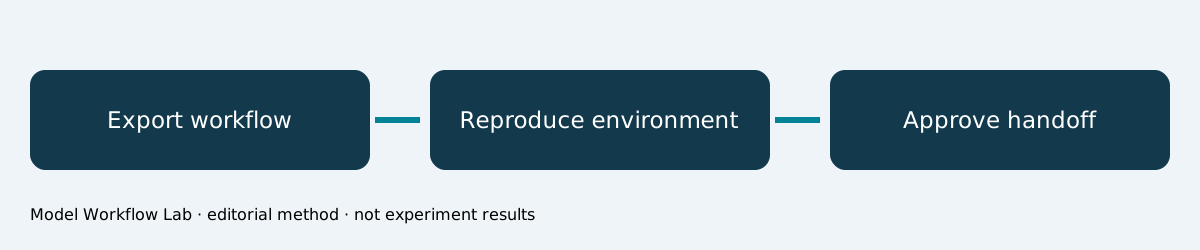
Which model should a shared workflow evaluate?
Start with MOSS-Image-SFT for direct image generation and MOSS-Image-Base when further development or LoRA training is required. Verify the current ComfyUI path and matching model components before sharing a workflow.45
This article concerns handoff reliability. See the local workstation guide, template layout assessment, and open-image overview for related choices.
A documented integration with an important distinction
The repository’s ComfyUI instructions distinguish native support from the optional Hugging Face directory plugin.6 The distinction matters because loader assumptions and workflow configuration can differ. Treat the current primary documentation as the implementation reference.
The existence of a node-based workflow does not establish that every exported file will run on another installation. Dependencies, weights, text encoders, and configuration must be identified together.
| Handoff item | What the recipient needs |
|---|---|
| Model | Exact variant and weight revision |
| Interface | ComfyUI version and required nodes |
| Components | Matching encoder and VAE references |
| Prompt | Positive text and layout input |
| Output | Dimensions and approved example |
| Review | Known defects and correction notes |
Scenario: a designer hands off an infographic
A design lead creates an infographic concept and asks another designer to produce the next edition. The recipient needs to change factual copy while preserving the intended workflow. This is a proposed production scenario based on documented integration support, not a named customer case.
Our editorial recommendation is to include both the workflow and its approved output. The image communicates intent; the workflow communicates process. Neither alone provides a complete reproduction record.
Verify before distributing
- Identify whether the workflow uses native support or a repository plugin.
- Record the checkpoint, text encoder, VAE, and node dependencies.
- Open the exported workflow in a clean, matching installation.
- Replace source paths with documented asset references.
- Generate the approved test brief using recorded settings.
- Review text, layout, and output dimensions against the reference.
Do not interpret a successful import as a successful generation. A workflow can load while referencing missing weights or incompatible components. Preserve the generation log with the handoff.
Model quality remains a separate assessment
MOSS-Image has a 5B backbone and supports natural language, tags, and JSON Layout inputs.1 Its report records 96.3% mean LLTB text coverage and leading results on the reported 7Bench layout measures.3
Those metrics explain why a text-rich infographic is a relevant test. They do not validate a particular ComfyUI workflow. The recipient must inspect whether its actual settings preserve the required wording and spatial relationships.
Where adaptation changes the evidence
Base and SFT have different intended roles.45 If a team adds a LoRA, record that artifact and its provenance separately. The original model’s reported benchmark does not become a benchmark for the adapted workflow automatically.
Keep a baseline output before adding adaptation. Compare the same brief before and after the change, including copy errors and layout defects. This makes the added component’s effect visible rather than assumed.
A useful handoff acceptance record
Ask the recipient to reproduce one approved asset and document deviations. Record environmental failures separately from image-quality failures. A missing node requires a different correction from an incorrectly rendered heading.
After reproduction, update the handoff with the verified environment. Avoid claiming portability across untested platforms. An actual successful reproduction can be reported with its settings; this article does not invent a private success rate.
Hand off one reproducible asset
Choose a factual infographic, reproduce it on the receiving installation, and preserve the environment record. Recommend the workflow after that concrete handoff succeeds.
Make external paths explicit
A workflow that runs on its author’s computer can still depend on an undocumented photograph, local font, or custom directory. List those inputs in the handoff and explain how the recipient obtains approved equivalents.
Then rerun the test using the recipient’s paths. The successful artifact should come from that reproduced environment rather than a copied image from the original machine. Keep both outputs for review and explain acceptable differences before accepting the handoff as complete.
English SEO keywords
best open source text to image models; MOSS-Image; ComfyUI workflow; reproducible image generation; model components; design handoff.
Sources
Frequently asked questions
Does ComfyUI integration mean identical behavior everywhere?
No. Check versions, components, loaders, and generation settings. Integration support is not universal environment compatibility.
Should a workflow include licensed weights directly?
Follow the distribution terms for each component. A manifest of official sources may be more appropriate than packaging every artifact together.
Can the original model benchmark validate an added LoRA?
No. Evaluate the adapted workflow on its own intended task and retain the comparison conditions.